/poll "Lunch on Friday?" "Tacos" "Sushi" "Salad"
Stop deciding in threads.
Type one command. Just Poll posts a poll your team answers in a click — with live result bars in the channel where the conversation already lives.
 Just PollAPP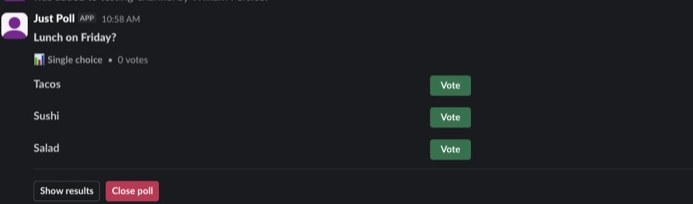
How it works
One command, three beats
Type the command
/poll "Lunch on Friday?" "Tacos" "Sushi" "Salad"
Any channel, one line. Add --multi to allow several picks or --anonymous to hide who voted for what.
Your team votes
Buttons on the poll card. One vote per person, enforced atomically. Result bars move the moment a vote lands.
Close it when it’s decided
One click locks voting, the winner is right there, and the results export to CSV or JSON whenever you need them.
Features
The product, not a mockup
Every image below is Just Poll running in a real Slack workspace — captured, not composed.
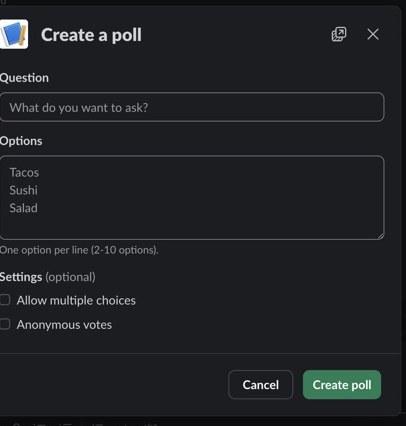
Command or form
Two ways to build the same poll
Quoted options on the command line if you know what you want; a clean form if you don’t. Type /poll on its own and pick multi-select and anonymous with a toggle each.
Live results
Watch every vote land
Result bars, counts, and percentages update in place — no refresh, no re-post. Voters see the tally; you see the decision forming.
Just PollAPP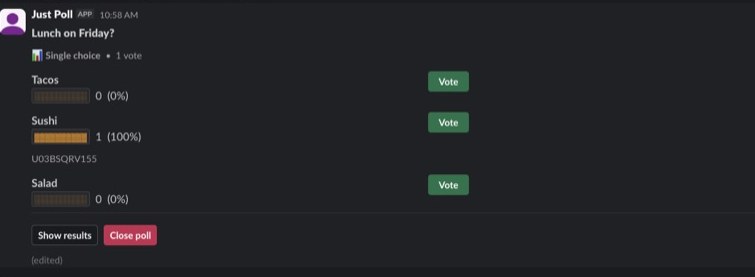
Close & export
Close the poll, keep the answer
Closing locks the vote and stamps the card, so late clicks don’t rewrite history. Results export to CSV and JSON — open or closed.
Just PollAPP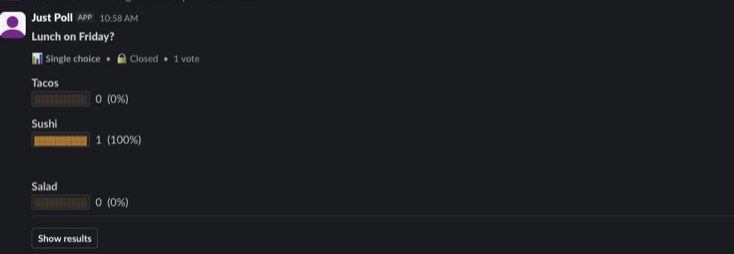
Anonymous by hash
Votes stored as one-way hashes. Duplicates blocked, identities unreadable — even to the workspace admin.
Scheduled polls
Recurring standups and check-ins, with a 15-minute floor and per-user caps so nobody spams the channel.
Templates
Save any poll as a template and post it again with one command. The weekly question stops being typing practice.
Free. Unlimited. Self-hosted.
FreeEvery feature. No tiers, no vote caps.
UnlimitedPolls, votes, schedules, and exports.
Self-hostedYour data stays on your server.
FAQ
Asked and answered
Is it really free?
Yes — every feature, unlimited polls and votes. Just Poll is self-hosted, so there is no per-seat pricing and no tier to upgrade to.
Where does my data live?
On your own server. Just Poll is self-hosted: poll definitions and results sit in your database, never on ours.
Can votes be anonymous?
Add --anonymous to the command. Votes are stored as one-way hashes, which blocks double-voting without recording who picked what.
Can a poll run on a schedule?
Yes. Scheduled polls can recur with a 15-minute minimum interval and per-user caps, so recurring surveys stay tidy.
How do I install?
Click "Add to Slack", review and grant the requested scopes, then invite the bot to the channels where you want polls with /invite @Just Poll.
How do I get results out?
Export to CSV or JSON at any time — while the poll is open or after it closes. Nothing is locked behind the app.